- DATE:
- AUTHOR:
- Nedap Livestock Management

Velos 2026.2 Dairy Farming
This Nedap Velos software version contains new and improved functionalities that provide new solutions, add valuable options to existing solutions and further increase the ease of use of Velos.
Nedap Now Data Export Process Now Available for Business Partners
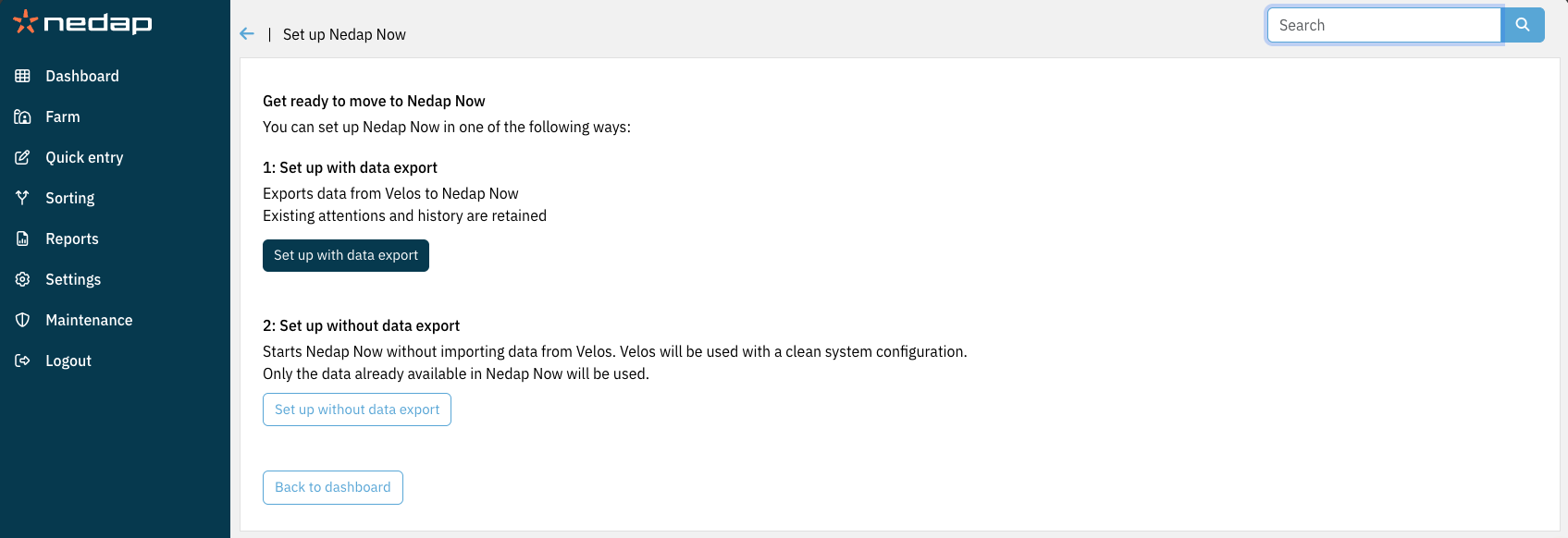
When converting a standalone Velos installation into one that operates in combination with Nedap Now, data can now be exported directly from Velos to Nedap Now. This ensures a smooth transition, allowing attentions that were visible in the standalone installation to be immediately available in the Nedap Now environment, without the need to wait several days for data to accumulate.
Previously, this export process was always carried out under the supervision of a Nedap support employee. It has now been improved to be more reliable and user-friendly. As a result, business partners can perform the export themselves without needing to contact Nedap support in advance.
What’s Improved
More reliable exports: The system now automatically retries and continues the export process in case of connection issues.
Better visibility: Export progress can now be monitored, including details such as the number of animals processed.
Fewer data issues: Enhancements reduce conflicts in Nedap Now, particularly in relation to animal data handling.
Easier Setup
Business partners can now complete most Nedap Now setup steps independently, without requiring Nedap support in standard situations.
When Nedap Support Is Still Required
In the unlikely event of a failed export.
For complex setups, such as multiple farms within a single Nedap Now company.
These updates are designed to streamline the export process and reduce the need for manual intervention or support. If Nedap support is required, you will be advised accordingly.
Improvements
Reintroduction of Page Titles

In Velos 2025.3, Velos received a refreshed look and feel. While the visual design was updated, all pages, menus, and navigation elements remained in their familiar locations, ensuring a smooth transition and easy navigation for existing users.
However, during this update, page titles were removed, which sometimes made it unclear which page a user was viewing. Page titles have now been reintroduced and are consistently displayed in the same location on every page, improving clarity and orientation within the system. An arrow appears before the title, serving the same function as the browser’s back button.
Sorting Page Improvement
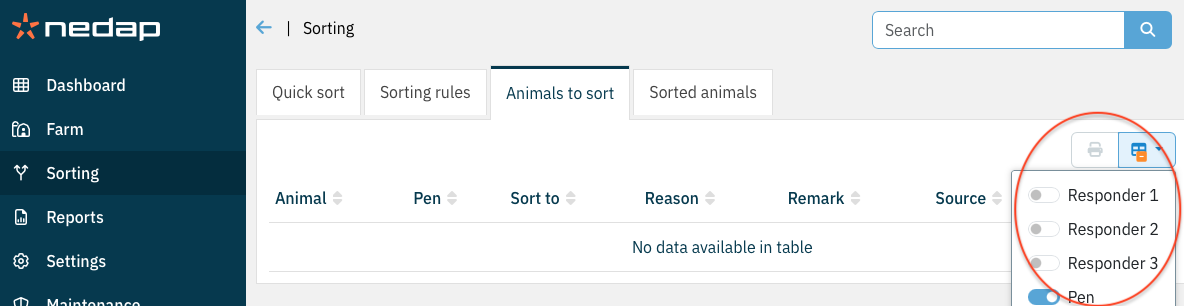
Improved the "Animals to sort" tab on the Sorting page to provide more flexible and accurate handling of Responder information.
The Responder column is now hidden by default, as it is primarily relevant for testing and debugging scenarios. Users can easily enable it via the column selector when needed.
When "No. of tags per animal" (configured under Settings → General) is greater than 1, users can now display multiple responder columns, ensuring clearer visibility of all assigned responders per animal.
PPID Monitoring Improvement
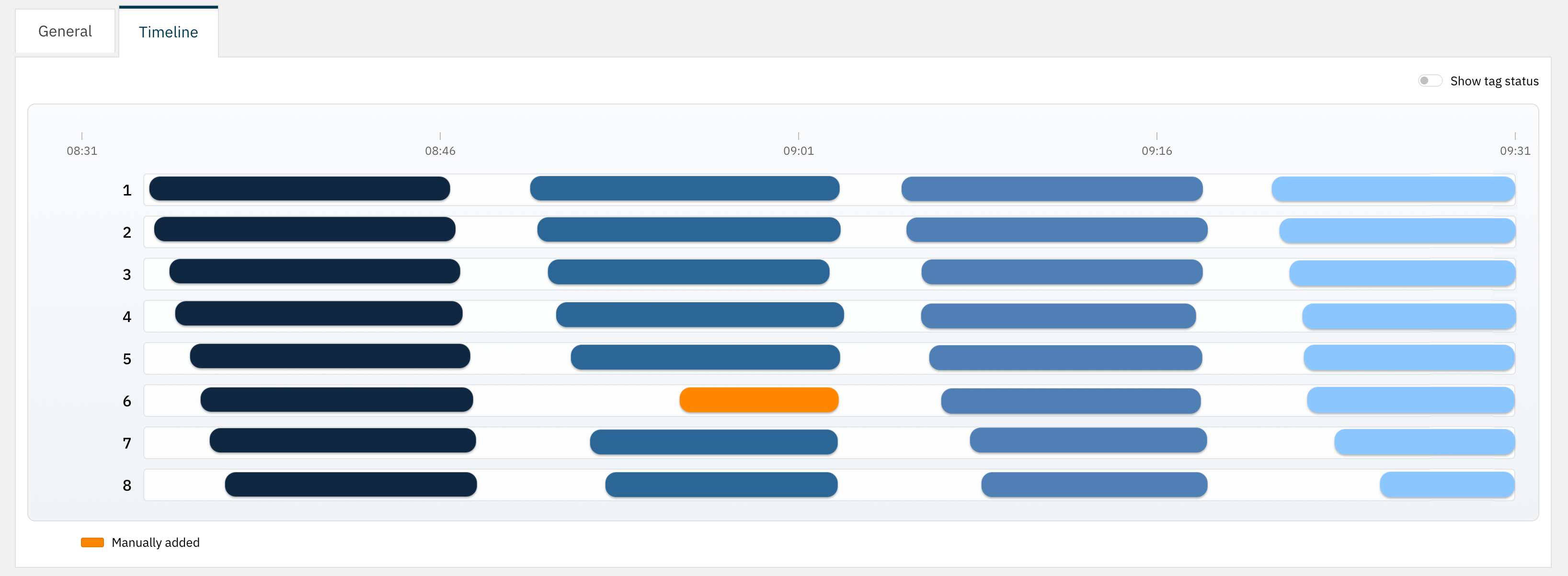
Troubleshooting PPID-related issues has often been difficult due to limited visibility into where failures occur. To improve observability, a visual PPID event timeline has been introduced. The timeline provides a chronological overview of key PPID events and interactions, making it easier to understand system behavior, trace issues, and gain insight into how PPID performs.
Small improvements and fixed issues
Nedap constantly updates the software to prevent security vulnerabilities. In this version some 3rd party libraries have therefore been updated.
It is now possible to retrieve activity in 2-hour intervals based on ear tag data via the Velos.NET API. All existing methods for retrieving 2-hour activity intervals in the Velos.NET API will also return intervals generated from ear tag data, if available. This functionality is only supported when Velos is operating in Nedap Now mode.
An issue has been resolved where mixing FDX and HDX tags within a herd caused IDs to be handled incorrectly in the SmartSort behavior component, leading to missed sorting actions. For example, Animal 1 with an FDX responder was correctly identified and directed toward the sorting pen. When Animal 2 with an HDX responder, which should not be sorted, was detected, the sort gate returned to its default position as expected. However, if Animal 2 was no longer detected while Animal 1 was still present, the sort gate did not redirect toward the sorting pen, resulting in Animal 1 not being sorted. This behavior has now been corrected.
The link “V-pack firmware” on the dashboard now redirects directly to the page “Maintenance → V-packs”, where the update can be performed.
It is now once again possible to create a sorting rule on the animal page when Velos is operating in Nedap Now mode.
With Velos operating in Nedap Now mode, if an animal was listed under “Sorted animals” and the sorting pen to which it was sorted was removed, the animal was also removed from the list. Now, the animal is no longer removed; instead, it is moved to its home pen.
An issue has been resolved where a SmartSight IP camera could not be detected due to firewall rules.
Enhanced pen monitoring. Animal pen changes detected by sorting units are now incorporated into pen monitoring, enabling more comprehensive tracking of animals across the system. Pen monitoring alerts are generated only when animals are detected in a location classified as a Pen that differs from their assigned pen. This prevents unnecessary or persistent alerts for animals that are only temporarily present in sorting pens.
Improved clarity in the page accessed via Dashboard → Calendar widget → Heat. The column previously labeled "Insemination date" has been renamed to "H or I date", reflecting that it displays either the insemination date or, if unavailable, the heat date. Updated the description of the Heat attention setting under Settings → Calendar → General to "Days since insemination or heat", providing a clearer explanation of how this value is calculated.
The parlor configuration page did not generate the correct numbering for InTouch behavior components. This issue occurred when the numbering was not sequential—for example, in a milking parlor with stalls 10 to 19 on the left and 30 to 39 on the right, the behavior components were incorrectly numbered from 10 to 29. Behavior components are now numbered in accordance with the actual stall numbering.
When the Nedap Rotary ID with feeding behavior component was running on a secondary VPU, it occasionally used default portion sizes instead of the calibrated values. This issue has now been resolved.
When changing a responder on the SmartTag No Data tab of the Tag Issues page, Responder 1 was always modified. This worked correctly only when each animal had a single responder. However, when multiple responders were assigned to an animal and the responder with the tag issue was not Responder 1, that responder remained unchanged, while Responder 1 was updated instead. This issue has been resolved. The responder associated with the tag issue is now correctly updated.
In VPaint it was possible to give objects a negative size which resulted in an un-clickable object on the canvas. This has been fixed.
In the latest firmware version, the VP1801 no longer uses contiguous memory blocks to program the firmware. Velos has been updated accordingly and now takes this into account when performing firmware updates.
Users without the “Edit VPack settings” permission are no longer allowed to update firmware on V-Packs.
In rare cases, a VPU did not restart correctly after an update, requiring a power reset. This issue has now been resolved.
Previously, on the page “Maintenance → V-Packs”, it was possible to select the ‘Pair’ and ‘Unpair’ actions for every V-Pack. This is now only available for V-Packs of type VP4201 and VP4102 (repeater). When other V-Pack types are selected, the ‘Pair’ and ‘Unpair’ options are disabled.
When multiple Taurus 5 instances accessed Velos simultaneously, Velos could become locally unavailable. This was observed with the Uniform Taurus connection. When too many requests are made at the same time, Velos now returns a 429 status code: Too Many Requests.
Firmware
New firmware has been added for the following V-Packs:
VP1801: v3.13.04
Security updates.
Improvements on wireless sync mode configuration.
Minor fixes.
Warning in web interface when VPack menu is active.
Small improvements label history graph.
Better logging for input contact errors.
Wireless sync: added multiple pre sets in custom mode.
Support for alternative hardware components.
Less event logging in ILS application.
VP4102: v3.07.07
Security updates.
System requirements
VPU
All VPUs in the installation, both main and secondary, must be a VP8002 or a VP8621.
Velos version
An installation needs to run on version 2024.1.SR4 or newer to be able to update to this version. Make sure to update to version 2024.1.SR4 first before installing this version.
Taurus
This Velos version is compatible with Taurus 6.x.x.x for all integrations. Taurus with build numbers 5.x.x.x are deprecated and therefore it is advised to use the latest Taurus 6.x.x.x
When using Taurus 5 for a DelPro integration this Velos version is only compatible with Taurus 2024.1.1 (5.147.25.0)
For all other Taurus 5 integrations this Velos version is compatible with Taurus 2020.1 (5.101.7.0) up to and including Taurus 2024.1.1 (5.147.25.0)
Supported browsers:
Google Chrome
Microsoft Edge
Apple Safari
Mozilla Firefox